Embedded conversational analytics and dashboard customization for a multi-tenant B2B payments platform.
In short
Problem: Merchants saw one fixed dashboard; any other question meant asking the operations team for a CSV export.
What I built: An AI assistant inside the dashboard that answers plain-language questions with live charts and lets each user shape their own layout, isolated per tenant and cost-capped.
Result: Merchants answer their own data questions and build the dashboard they need, with AI spend limited per user and per tenant.
At a glance: ~80 issues · 13/13 E2E tests · 5/5 live merchant requests · tenant-isolated · cost-capped
- Role: Lead and sole engineer
- Timeline: About 4 months, 2026 (1 month core build, 3 months of upgrades and testing)
- Stack: Python, Django, Anthropic Claude, SSE, ApexCharts, PostgreSQL, Playwright
Overview
I built an AI dashboard assistant for a multi-tenant payments CRM used by online merchants. Merchants explore their data and reshape their dashboard in plain language, for example: "Show revenue by gateway for the last 30 days."
The agent reads tenant-scoped data, builds the right chart and streams a live preview to the dashboard. The merchant then accepts or discards it.
The problem
Every merchant saw the same fixed dashboard: 4 KPI cards and 4 charts covering 90 days, hard-coded in Python.
- Questions outside those metrics needed an operator or a CSV export.
- Layouts could not be personalized per user.
- The backend had no LLM integration.
- The data is live payments and customer bank details across many tenants, so tenant isolation and predictable AI cost were hard requirements.
What I built
An assistant docked on the merchant dashboard that:
- turns natural-language requests into charts over tenant-scoped data, with named date ranges, group-by breakdowns (top 6 plus "Other") and several metrics on one chart;
- knows the current dashboard, page and caller, so "remove the churn chart" or "put this after gross revenue" works;
- runs merchant-created Skills and meters every turn against cost limits (both covered below).
The agent cannot create or change business records. It only composes dashboard views, and a view is saved only when the merchant clicks Accept.
Architecture
The agent runs inside the existing Django backend, with no separate AI service. Guards run before any model call, and the agent never writes the saved layout itself.
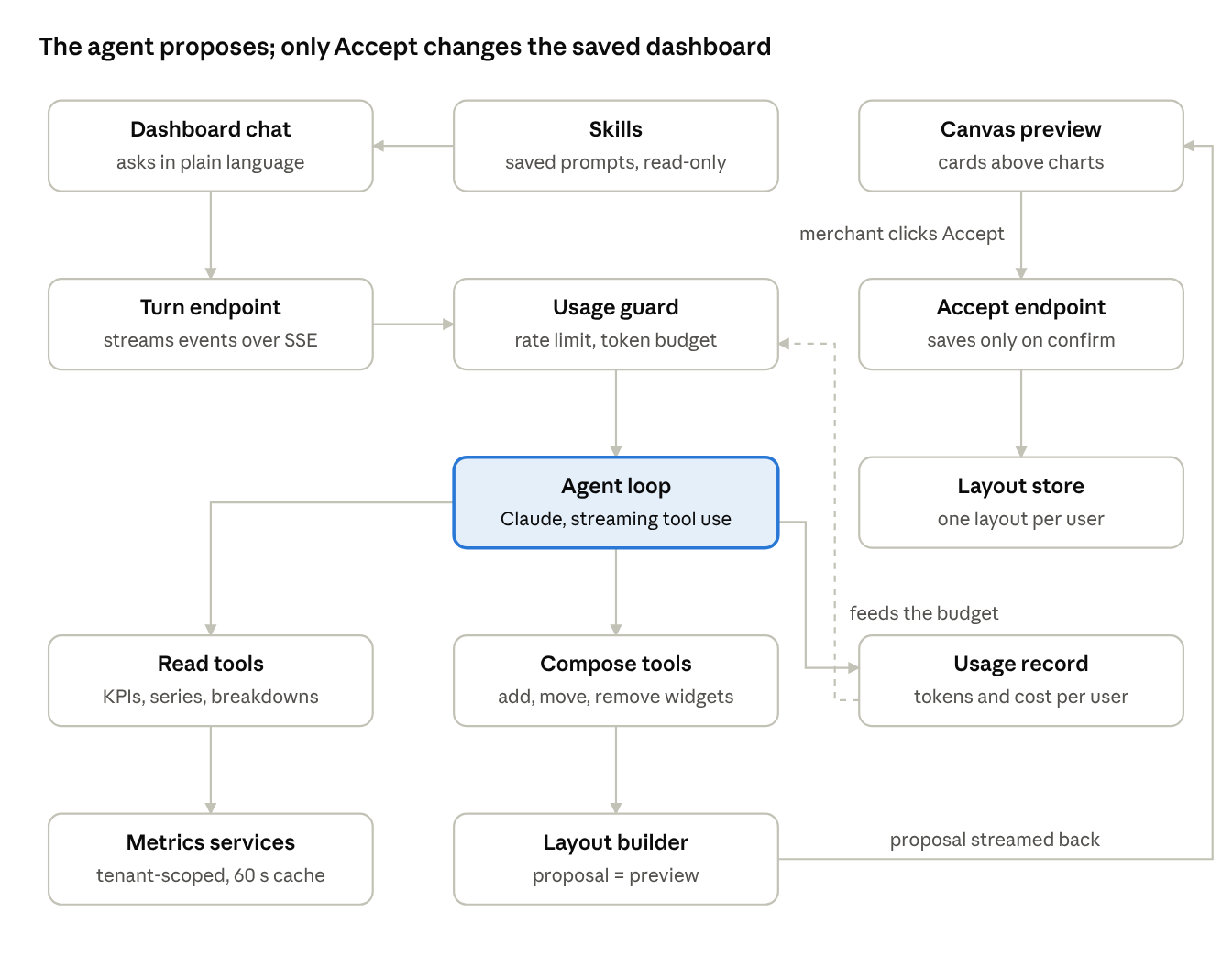
Read tools pull tenant-scoped metrics through a 60-second cache. Compose tools edit a per-turn layout builder, whose proposal streams back as a preview. Only Accept persists it. Skills enter through the same chat, so they pass the same guards; every turn writes a usage record that feeds the token budget.
The view-only pivot
My first build gave the agent write actions: edit a lead's contact fields, create a lead, cancel a subscription. Each went through a preview-and-confirm diff, role gating (members and above) and an immutable audit log.
After review, the product owner cut scope: the merchant agent should only read data and compose views. I disconnected the write tools from the agent instead of deleting them. The view-only change touched one file, and the write framework is ready for a future admin tool.
Merchant-created Skills
Merchants can turn a prompt they use often into a Skill and run it again with one click.
- Create and manage: a management screen and API to create, edit and delete Skills, plus a run surface in the chat composer.
- Create from the conversation: the agent can suggest saving the current request as a Skill. It only proposes; the merchant confirms.
- Scopes: personal Skills for one user, shared Skills for the whole tenant, and platform-wide Skills published by administrators that tenants can opt out of.
- Guardrails: names are unique per scope (case-insensitive), each user has a cap on personal Skills, and a departed user's personal Skills are cleaned up.
- Usage signal: each Skill tracks its run count and last use.
Skills stay read-only, like the agent: a Skill can ask for data and views but cannot change records.
Cost tracking and usage limits
Every turn is metered, and limits are enforced before the model is called.
- Rate limits: a per-user and per-tenant request throttle. Over the limit, the API returns 429 with a retry time and no model call is made.
- Token budgets: each tenant has a token ceiling; the guard checks it before every turn and adds the turn's tokens after it.
- Clear messages: the chat tells the merchant whether they hit a rate limit or a usage limit, instead of a generic error.
- Configurable: administrators set the model and the limits in platform settings, without a code change.
- Cost record: each turn stores input and output tokens, estimated cost and latency per user, in a durable record used for billing.
- Reporting: a platform report shows AI usage and cost across all tenants and users.
Security and safety by design
The agent handles payment data for many tenants, so every layer limits what it can see, do and spend.
| Layer | Control |
|---|---|
| Tenant isolation | Every query runs inside the caller's tenant schema; the metrics cache is keyed by tenant, so one tenant's figures can never be served to another |
| What the agent can do | Read and compose tools only; write tools are not registered, and the accept endpoint rejects any data-change request |
| What gets saved | Nothing persists without the merchant's Accept; a preview can always be discarded |
| Who can use it | Role-checked access; customer-support staff are excluded, consistent with the platform's analytics rules |
| Secrets | The model API key stays server-side in environment config and never reaches the browser |
| Spend | Rate limits and token budgets are checked before any model call, and over-limit requests stop with a 429 |
| Kill switch | One feature flag turns the chat off for everyone without affecting the dashboard |
The original write framework (see the view-only pivot above) kept the same posture: role gating, a preview-and-confirm diff and an immutable audit log for every change.
Key engineering decisions
Agent core
| Decision | Why | Trade-off |
|---|---|---|
| One Python backend owns the agent | Auth, tenant isolation, data access and deployment stay in one place; a future web client becomes a thin client of the same SSE endpoint | Adapted a TypeScript reference pattern to Python |
| Custom tool-use loop, no framework | Full control of streaming, tool execution, errors, token accounting and cost | More runtime code to own |
| Preview, then Accept | A clear boundary between model output and saved state | One extra click per change |
| Guards before the model call | Per-user and per-tenant rate limits and token budgets return a 429 before any spend | Limits need tuning by tenant size |
| Short-lived tenant-scoped cache | Repeated KPI questions don't re-hit Postgres | Figures can lag by up to 60 seconds |
Skills and cost
| Decision | Why | Trade-off |
|---|---|---|
| Skills are read-only and run through the same agent | A saved prompt can never become a back door to change data; every Skill passes the same tools, guards and limits as a typed request | Skills cannot automate actions |
| The agent suggests a Skill; the merchant confirms | No Skill is created without a person approving it | One extra step to save |
| Three Skill scopes with per-user caps | Personal Skills don't clutter the tenant, and caps keep storage and prompt size bounded | Administrators own the platform-wide set |
| Meter every turn in a durable record | Cost is attributed per user and tenant, ready for billing; the write is isolated so a metering failure never breaks the chat | One extra database write per turn |
| Model and limits live in platform settings | Operators change the model or tighten limits without a deploy | Settings changes need their own governance |
Development and ownership
I was the lead and the only engineer, from research to production-ready code.
- Wrote the technical design, then a 40-issue roadmap in 4 milestones (dashboard preview, other surfaces, write actions, hardening), with dependencies mapped between issues.
- Built every layer: agent runtime, tool registry, metrics services, widget catalog, per-user layouts, SSE endpoints, chat UI, tests and the eval harness.
- Adapted when the direction changed. The first version was a standalone assistant page; the product owner wanted it on the real dashboard, editing the real charts. The machinery already existed, so I pointed the dashboard at the saved layout, docked the chat on it and retired the standalone page.
In total the project covered about 80 issues.
Testing and validation
- Unit and database tests for every layer, run inside tenant schemas.
- Playwright E2E against the live agent: 13 of 13 green on the final dashboard suite (chat, preview, accept, discard, layout and theme persistence).
- An eval harness: golden prompts scored on tool choice.
- A model-comparison command to benchmark models on the same prompts.
- Definition of done: 5 real merchant requests, such as "revenue by gateway, last 30 days" and "approved volume today, above gross revenue", each produced the right tool calls and layout in live runs (5 of 5).
Test the conversation, not the tool
Some features worked at the tool level and still failed through chat. Asked for "revenue and chargebacks per day in one chart", the agent built two separate charts, because the catalog had no chart for two different metrics. I added a multi-metric overlay chart and taught the prompt to prefer it. The same request now produces exactly one chart.
Earlier, user testing found that the agent could list records but never get their IDs, so the write actions were unreachable by conversation, although every unit test passed.
Outcome
The embedded assistant and the layout-driven dashboard are integrated into the product. Every merchant gets the composable dashboard, and one feature flag controls the chat. The agent runtime, tool registry and SSE contract are reusable, so new agents register on the same infrastructure.
Takeaways
- Connect AI to the real product surface early. The first four milestones worked in a sandbox page; the value appeared on the real dashboard.
- Test conversations, not just tools. A capability can exist and still be unreachable through natural language.
- Keep AI changes reversible. Preview-and-confirm separates model output from saved state.
- Build cost controls into the architecture. Limits belong in front of the model, not in a report after the bill.
- Design the runtime for reuse. A tool registry, a streaming contract and a shared loop make the next agent cheap.
The model is one component. The architecture around it decides whether the feature is reliable, safe, testable and useful.